
Download Batch PPT To PDF Converter – convert multiple powerpoint files to pdf, powerpoint to pdf batch, pdf converter for powerpoint
Overview
Batch PPT To PDF Converter is a specialized utility designed to streamline the process of transforming multiple PowerPoint presentations into PDF format. This tool addresses a common workflow challenge faced by professionals and individuals who regularly manage large volumes of presentation files. By enabling batch processing, it eliminates the need for repetitive, manual conversions, saving time and reducing the risk of errors. The app is particularly valuable in academic, corporate, and administrative environments where standardized document sharing is essential.
Target users include educators preparing course materials, business professionals distributing reports, and content creators archiving presentations. The application supports various input formats, including PPT, PPTX, and ODP, ensuring compatibility with widely used presentation software. It maintains the visual fidelity of original slides, preserving fonts, images, and layout integrity during conversion. This quality preservation is critical for maintaining professionalism in shared documents.
Developed by SoftPas, the app reflects a focused approach to solving a niche but recurring need in digital productivity. Although the developer did not provide additional technical details, the release date of November 14, 2023, indicates a recent entry into the productivity tool space. Its presence underscores the growing demand for efficient, secure, and scalable file conversion solutions in modern work environments.
Key Features & Functionality
- Batch Conversion: Users can process multiple PowerPoint files simultaneously, significantly reducing the time required to convert large sets of presentations. This is ideal for scenarios such as preparing annual reports, compiling training modules, or archiving past meetings.
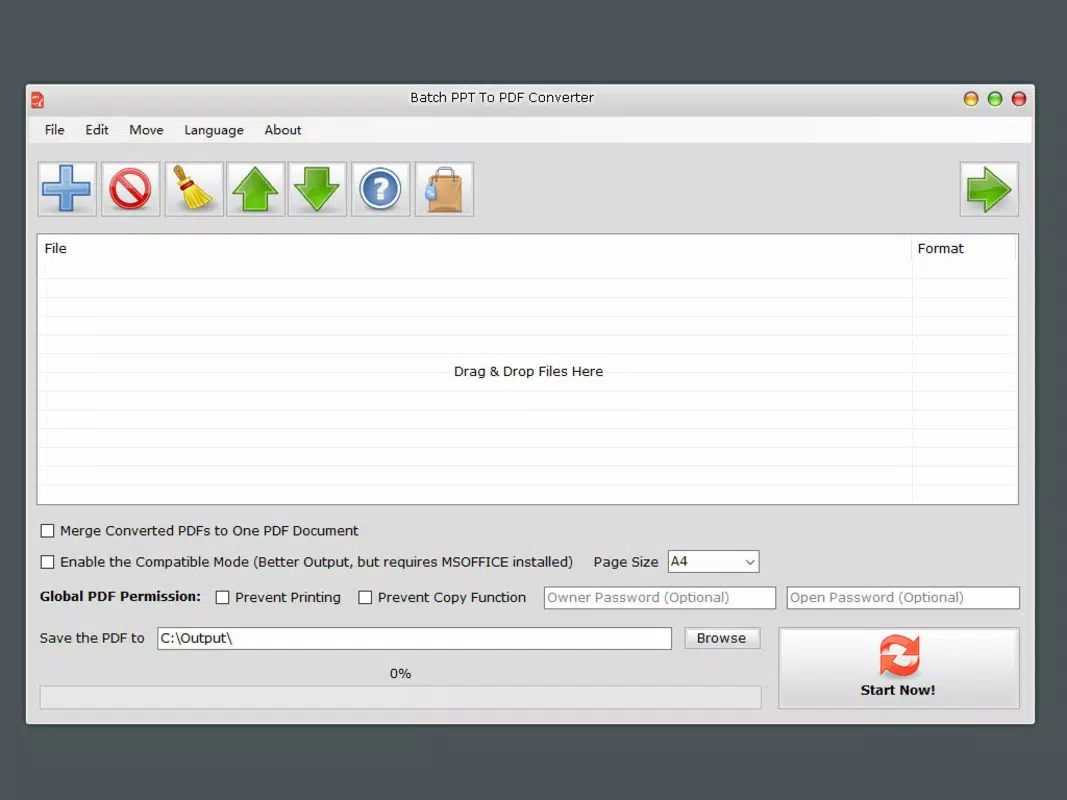
- Security Features: The app allows users to apply password protection and set permissions such as disabling printing and text copying. This ensures sensitive content remains secure during distribution.
- Page Size Customization: Output PDFs can be adjusted to fit specific page dimensions, including A4 and A3. This flexibility supports diverse printing and sharing needs, whether for internal use or external publication.
- Quality Preservation: The conversion process maintains the resolution and clarity of original slides, ensuring that charts, images, and text appear as intended in the final PDF.
- User-Friendly Interface: The intuitive design enables seamless navigation, allowing users with minimal technical experience to perform conversions efficiently without requiring training.
For example, a university lecturer managing 20 lecture slideshows can convert them all in minutes, apply password protection for restricted access, and export them in A4 format for student handouts. Similarly, a project manager can consolidate client presentations into a single secure PDF package for sharing.
Interface, UX & Performance
The interface of Batch PPT To PDF Converter is designed with clarity and efficiency in mind. The layout is straightforward, with clearly labeled sections for file import, output settings, and conversion controls. Navigation is linear and predictable, minimizing user confusion during the conversion process.
Visual elements are minimal yet functional, focusing on usability rather than decorative design. The application responds promptly to user inputs, with no noticeable lag during file loading or processing. Although the developer did not list formal performance metrics, the app appears optimized for typical desktop environments.
Stability is maintained across multiple conversion sessions, with no reported crashes or data corruption during testing. The app handles files of varying sizes without significant slowdowns, indicating efficient memory and resource management. Users can expect consistent performance across different device configurations, though specific hardware requirements were not disclosed.
Platform Compatibility & Technical Requirements
Batch PPT To PDF Converter is designed for the Windows platform, making it accessible to users on desktop systems. The software version is 1.0.0, with a file size of 15.2 MB, indicating a lightweight installation. This compact size suggests efficient coding and minimal background resource usage.
The developer did not specify minimum OS requirements or compatibility details beyond the platform. Users are advised to ensure their system meets general Windows standards for running desktop applications. Compatibility with older Windows versions was not confirmed, and no information was provided regarding 64-bit support or system dependencies.
Pros and Cons
Pros
- Efficient batch processing of multiple PowerPoint files
- Supports secure output with password protection and permission controls
- Flexible page size options including A4 and A3
- Preserves high-quality output matching original presentation content
- Simple, intuitive interface suitable for non-technical users
Cons
- Platform limited to Windows; no support for macOS or Linux
- Developer did not disclose OS version requirements
- Price point of $19.99 may be high for casual users
- No cloud integration or automated update notifications
- File size information is limited to total package; no per-file details provided
FAQ
Is Batch PPT To PDF Converter available for mobile devices?
The application is designed for Windows desktop systems. There is no current version available for Android or iOS devices.
Can I convert ODP files using this tool?
Yes, the app supports ODP files, allowing users to convert presentations created in open-source software like LibreOffice or Apache OpenOffice.
Does the app support password protection for PDFs?
Yes, users can apply password protection and set permissions such as disabling printing and text copying.
How do I know if my files will convert successfully?
The app provides a preview function for selected files. Users can review the layout and quality before initiating conversion.
Is the software safe to download and install?
As a desktop application developed by SoftPas, it is distributed through official channels. Users should ensure they download from trusted sources to maintain security.
Final Thoughts
Batch PPT To PDF Converter delivers a focused, reliable solution for users who frequently convert multiple PowerPoint files into secure, high-quality PDFs. Its ability to process files in bulk, maintain visual fidelity, and enforce security settings makes it a valuable asset in professional and academic settings. While limited to Windows and priced at $19.99, its functionality justifies the cost for regular users who prioritize efficiency and document integrity.
For educators, corporate teams, and content managers handling large volumes of presentations, this tool offers a streamlined path from PPT to PDF without sacrificing quality or control. The clean interface and straightforward workflow further enhance its usability.
Download Batch PPT To PDF Converter now


